Walk into nearly any conversation about Oracle GoldenGate these days and you’ll hear two words tossed around almost interchangeably: migration and replication. They’re not the same thing. The product can absolutely do both, and it does both well, but the design decisions, the operational expectations, and even the team that owns it on day 31 look completely different depending on which one you’re actually doing.
After helping more enterprises than I can count plan and execute these projects, here’s how I think about the difference – and why getting it right at the start saves a lot of pain later.
The Short Version
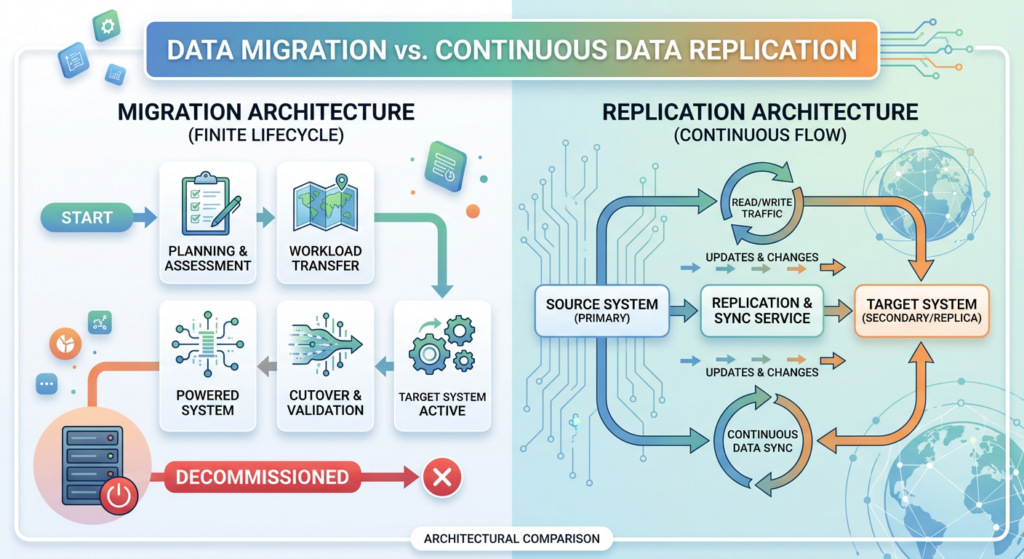
Migration is a project. It has a start date, a finish date, and a cutover. When the application is pointed at the new database and everyone goes home, GoldenGate gets decommissioned.
Replication is a service. There is no finish date. The day after go-live, you’re still running, monitoring lag, handling DDL, and answering pages.
Same tool. Different job.
Oracle GoldenGate for Migration
Migration is what most DBAs think of first when GoldenGate enters the conversation – usually because there’s a database upgrade, a platform shift, or a cloud project on the calendar.
Common scenarios where I see GoldenGate used for migration:
- Database upgrades – moving from 11g or 12c to 19c, or 19c to 23ai, with minimal downtime
- On-premises to cloud – lifting an Oracle workload to OCI, AWS, GCP, or another provider
- Heterogeneous moves – Oracle to PostgreSQL, SQL Server to Oracle, or any cross-platform jump
- Data center consolidation – merging or moving infrastructure footprints
- Hardware refresh – new servers, new storage, same database
The architecture is purpose-built for the cutover:
- Initial load brings the target current
- Extract and Replicat keep the target in sync while the source remains live
- The application gets cut over during a planned window
- Optional: run replication in reverse for a validation period in case rollback is needed
- Once you’re confident, GoldenGate gets decommissioned
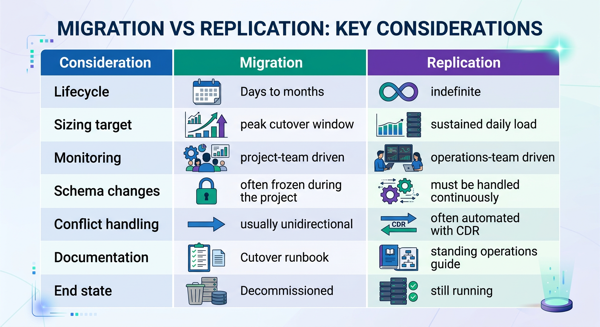
The whole architecture has an expiration date, and that changes how you size, monitor, and even document it. You’re optimizing for the cutover window, not the next five years.
Oracle GoldenGate for Replication
Replication is a different from Migrations. The whole point is that it never ends.
Common scenarios:
- Real-time reporting – offloading queries to a copy of production without blocking transactions
- Active-active configurations – multiple writable databases across regions, kept in sync
- Disaster recovery – a continuously updated standby for business continuity
- Data warehouse feeds – streaming OLTP changes into an analytics platform
- Hub-and-spoke distribution – one source feeding many downstream consumers
Because there’s no finish date, you have to build for the long haul. That means thinking about:
- Capacity planning for sustained throughput, not just a peak window
- Heartbeat tables and lag monitoring so you actually know when something’s wrong
- DDL handling – schemas change over time, and replication has to keep up
- Conflict detection and resolution (CDR) – especially for bidirectional or active-active setups
- Patching, upgrades, and backups for GoldenGate itself, not just the databases
- Alerting and runbooks because someone is going to get paged at 2 a.m.
In short, replication needs an operations playbook. Migration just needs an end date.
Side-by-Side: Where the Differences Show Up
Where I See Teams Get This Wrong
A few patterns I run into often:
- Treating a replication project like a migration – sized for go-live, not for life. Six months in, the trail files are filling disk and nobody’s watching.
- Treating a migration like a replication build – over-engineering monitoring and tooling for something that gets turned off in 90 days.
- Skipping heartbeat tables because “it’s only a migration” – until something goes sideways during cutover and you have no real visibility into actual lag.
- No clear decommission plan – GoldenGate keeps running months after the migration is done because nobody owns shutting it down.
Practical Recommendations
Before the first Extract is configured, get clear answers to a few questions:
- What does the end state look like – is GoldenGate gone, or is it permanent?
- Who owns this on day 31, day 91, and day 365?
- What is the acceptable lag, and how will we know we’ve exceeded it?
- How do we handle DDL changes after go-live?
- If this is bidirectional, what’s our conflict resolution policy?
The tool is the same. The architecture should reflect the lifecycle.
Wrapping Up
Migration and replication are both legitimate, well-supported uses of Oracle GoldenGate, and I’ve delivered plenty of both. The mistake isn’t picking the wrong one – the mistake is not deciding up front which one you’re actually doing.
Set the expectation early, design to the lifecycle, and make sure the team that owns it after go-live is in the room before go-live. Get those pieces right and GoldenGate will deliver, whether it’s around for 90 days or 9 years.
What does success look like for your next GoldenGate project? I’d love to hear how others are drawing the line between these two patterns.
Please follow and like:


Bobby Curtis

I’m Bobby Curtis and I’m just your normal average guy who has been working in the technology field for awhile (started when I was 18 with the US Army). The goal of this blog has changed a bit over the years. Initially, it was a general blog where I wrote thoughts down. Then it changed to focus on the Oracle Database, Oracle Enterprise Manager, and eventually Oracle GoldenGate.
If you want to follow me on a more timely manner, I can be followed on twitter at @dbasolved or on LinkedIn under “Bobby Curtis MBA”.
Follow if you like:


