
I’ve spent enough years around Oracle GoldenGate to have one rule burned into my brain: don’t let a piece of production infrastructure quietly depend on a database nobody backs up, monitors, or is even fully aware exists. So when I fired up Striim for the first time and found it happily using its bundled Derby instance for the metadata repository — doing exactly what it’s supposed to do, no complaints — I still went looking for the PostgreSQL option before I did anything else. Old habits.
Turns out, it’s a short list of steps. Here’s what I ran, what each piece is actually for, and where I’d tell you to slow down.
Quick facts before we start:
- Striim’s metadata repository, or MDR, can live on Oracle, PostgreSQL, or the bundled Derby instance
- Derby is the default — no setup required, great for a first install or a demo
- Moving it to Postgres is three SQL statements, a schema, and two scripts
- The whole thing took me longer to write up than to actually run
Why Bother Moving Off Derby?
Here’s my honest, not-yet-engineering-verified take: an embedded, file-based database is fantastic for getting Striim running in five minutes, and not so fantastic once you want it to live inside the same backup, monitoring, and access-control story as everything else your team runs — especially the moment more than one Striim node needs to see the same repository. (I’m flagging that reasoning as my own working assumption, not a confirmed Striim engineering statement — if you’re citing this externally, get an engineering sign-off on it first.) Pointing the MDR at a Postgres instance you already operate means it stops being a special case and just becomes one more database your existing tooling already knows how to handle.
What’s Actually Living in There
The MDR isn’t decoration — it’s where Striim keeps the state it needs to manage change data correctly: application definitions, checkpoints, recovery bookkeeping, the stuff that lets a source or target pick up cleanly after a restart. If this repository goes sideways, recovery is what suffers. That’s the whole reason its backing store is worth thinking about at all.
Striim supports Oracle, PostgreSQL, or Derby for this. I’m covering PostgreSQL here — you’ll need a reachable Postgres instance and a role that can create databases and grant privileges before you start.
Step 1: Create the Role and the Repository Database
Connect to PostgreSQL and run:
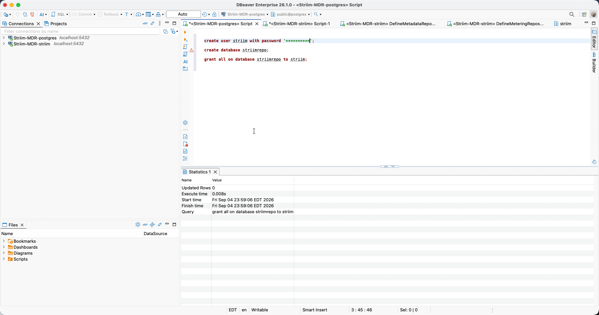
create user striim with password '<password>';
create database striimrepo;
grant all on database striimrepo to striim;
Wait — what about that password? Use a real, secret-managed one here; <password> is a placeholder, not something to copy-paste into a script. Notice in the screenshot below that DBeaver masks it in the editor even though it’s a plain string literal in the statement — that’s your reminder to keep it out of shared scripts, tickets, and screenshots once you’re past this walkthrough. I didn’t fight that instinct; I’m following it here too.
Figure 1: Creating the striim role, the striimrepo database, and granting privileges in DBeaver, connected to the PostgreSQL instance.
Step 2: Schema, Then Search Path
Reconnect — this time to the striimrepo database itself — and create a dedicated schema for Striim’s objects, then set it as the default search path for the striim role:
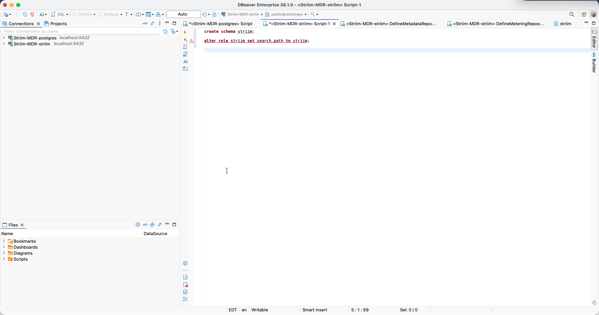
create schema striim;
alter role striim set search_path to striim;
That alter role ... set search_path line looks like a throwaway one-liner, but skip it and you’ll pay for it later: without it, the scripts in the next step have to fully qualify every object, and any tool or connection that assumes an unqualified schema will go looking in the wrong place. Set it once, on the role, and every future session under striim just lands where it should.
Figure 2: Creating the striim schema and setting search_path for the striim role, connected to the striimrepo database.
Step 3: Run the Two Scripts
With the role, database, schema, and search path all in place, connect as striim and run the two scripts that build out the repository objects:
conf/DefineMetadataReposPostgres.sql
conf/DefineMeteringReposPostgres.sql
DefineMetadataReposPostgres.sql builds the core application and checkpoint tables Striim reads and writes during normal operation. DefineMeteringReposPostgres.sql builds the usage and metering tables Striim uses for licensing and consumption tracking. Run both against the striim schema from Step 2 — and here’s where that search path pays off. Run these under a session where it doesn’t resolve to striim, and objects can land in the wrong place or fail to resolve against each other, and you get to enjoy debugging that on a Friday afternoon.
285 Tables Later
Once both scripts finish, you should have a striim schema inside striimrepo holding 285 tables. That number is what I saw on the version I ran this against — if you’re on a different Striim release, don’t take 285 as gospel; check your release notes.
Want to check your own count instead of taking my word for it?
select count(*) from information_schema.tables where table_schema = 'striim';
Come up well short of 285? Stop right there. Don’t connect the Striim platform to a half-built repository — go back, re-run the two scripts, and actually read the error output this time.
What’s Next
Repository built, repository verified – but I haven’t actually pointed Striim at it yet. That’s the connection config, the restart, and the “did it actually pick this up” check, and it’s got enough of its own gotchas that I’m giving it its own post rather than tacking it onto the end of this one.
One more thing, and I mean this: if you’re doing this against a live, Derby-backed deployment rather than a clean install, don’t just run these scripts and hope. Loop in your Striim technical contact first – moving the repository out from under something already running is a different risk profile than building one fresh, and that’s not what I walked through here.
For the full property reference and every supported repository configuration, the Striim documentation has you covered.
Enjoy!
Please follow and like:



Bobby Curtis

I’m Bobby Curtis and I’m just your normal average guy who has been working in the technology field for awhile (started when I was 18 with the US Army). The goal of this blog has changed a bit over the years. Initially, it was a general blog where I wrote thoughts down. Then it changed to focus on the Oracle Database, Oracle Enterprise Manager, and eventually Oracle GoldenGate.
If you want to follow me on a more timely manner, I can be followed on twitter at @dbasolved or on LinkedIn under “Bobby Curtis MBA”.
Follow if you like:


