
If you have spent any time tuning Oracle GoldenGate, you have probably leaned on a few favorite conventions to keep your parameter files clean. Mine has always been macros stored in their own library and pulled in with the INCLUDE parameter. So when I started building extracts and replicats in OCI GoldenGate, I went looking for the familiar dirprm and dirmac directories — and they were not there.
Here is the straight story: the rules of replication have not changed in the move to the cloud, but a few mechanics have. The microservices architecture behind OCI GoldenGate handles parameter and include files through the console rather than the file system. The good news is that everything I documented back in 2023 in GoldenGate Parameter Files – Format and Logic still holds true. You just access it differently, and macros are still very much on the table.
Key takeaways
- OCI GoldenGate has no
dirprmordirmacdirectory. The microservices console manages parameter and include files for you. - The
Parameter Filesmenu is the cloud equivalent ofdirprm. It lists every.prmand.incfile in the deployment. - You can only create files with a
.prmor.incextension, or a GLOBALS file. The familiar.macextension is gone. - Macros still work — just store them in an
.incfile. Write the macro into an include file and reference it with theINCLUDEparameter exactly as before.
Where include files live in OCI GoldenGate
In the classic architecture, the INCLUDE parameter pointed GoldenGate to a file on disk — usually in the dirprm directory or a custom location such as dirmac. A typical line looked like this:
INCLUDE ./dirmac/<file_name>.macOCI GoldenGate does not give you those directories. What it gives you instead is a menu option called Parameter Files, sitting near the bottom of the deployment navigation.
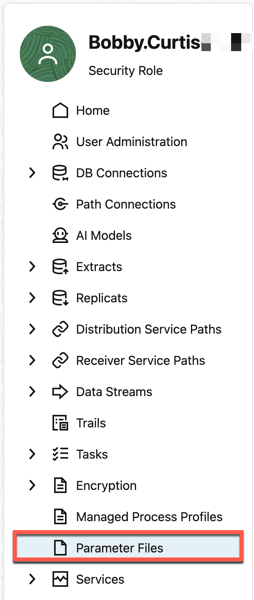
The Parameter Files list shows every .prm and .inc file in the deployment — notice BATCH.inc sitting right alongside the .prm files.
A couple of things worth flagging here. You will see your .prm files, and you may also notice an .inc include file already in the list. That is exactly where include files belong — this location is the direct equivalent of dirprm in the classic architecture.
One quirk to be aware of: old parameter files stick around even after you delete the extract or replicat they belonged to. My honest take is that this looks like a bug, but Oracle treats it as a feature. Either way, plan to clean up after yourself.
Adding an include file
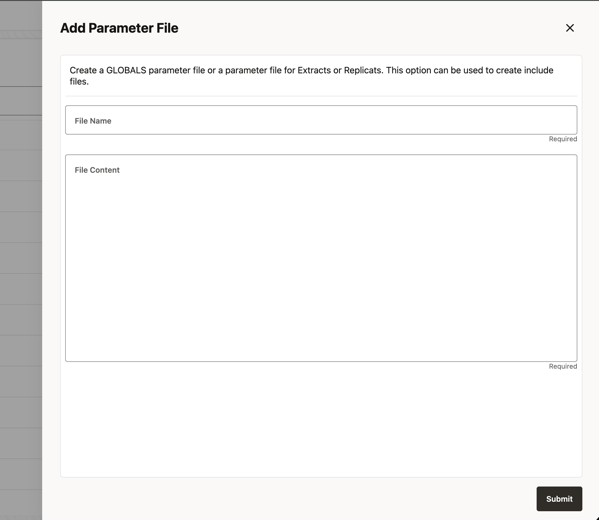
To add an include file, click the plus (+) sign on the Parameter Files screen. A panel slides in from the right. When you name the file, you are limited to a .prm or .inc extension, or the reserved GLOBALS name — there is no longer a .mac option.
So can you still use macros? Yes.
Once you see that the .mac extension is gone, the natural question is whether macros are gone too. They are not. The documented — and now standard — approach is to put your macro inside an .inc file. Write the macro exactly as you always have; you just store it with the include extension instead of .mac.
Here is an example you can try. Name the file reports.inc, then add the macro in the File Content area:
MACRO #report_settings
BEGIN
REPORTCOUNT EVERY 5 SECONDS, RATE
END;
Click SUBMIT, and the include file is now part of the deployment.
Referencing the include file
With the .inc file in place, you reference it from an extract or replicat the same way you always have — with the INCLUDE parameter. In the extract below, INCLUDE reports.inc pulls the macro definition straight into the IE111 parameter file.
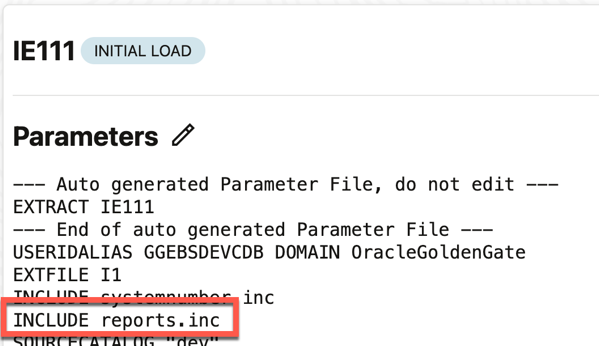
That is the whole trick. The syntax you already know carries over — only the storage location and the file extension have changed.
The bottom line
Moving to OCI GoldenGate — on OCI, AWS, Azure, or GCP — does not change the fundamentals of replication. What changes are the small operational details, like where include files live and which extensions you are allowed to use. Get those details right and your environment keeps running soundly. If you are knowledgeable about macros and include files in classic GoldenGate, this is the one adjustment you need to make the transition cleanly.
FAQ
Does OCI GoldenGate have a dirprm or dirmac directory?
No. The microservices architecture behind OCI GoldenGate does not expose those file-system directories. Parameter and include files are managed through the Parameter Files menu in the deployment console, which serves the same role dirprm did in the classic architecture.
Can you still use macros in OCI GoldenGate?
Yes. Macros are fully supported. Instead of a .mac file, you write the macro into an .inc include file and reference it with the INCLUDE parameter, just as you did before.
What file extensions can you create in the Parameter Files screen?
You can create files with a .prm or .inc extension, or a reserved GLOBALS file. The legacy .mac extension is not available.
How do you reference an include file in OCI GoldenGate?
Use the INCLUDE parameter followed by the include file name, for example INCLUDE reports.inc, inside your extract or replicat parameter file.
Do old parameter files get removed when you delete an extract or replicat?
No. Parameter files remain in the deployment even after the associated extract or replicat is deleted, so you will want to clean them up manually.
Please follow and like:



Bobby Curtis

I’m Bobby Curtis and I’m just your normal average guy who has been working in the technology field for awhile (started when I was 18 with the US Army). The goal of this blog has changed a bit over the years. Initially, it was a general blog where I wrote thoughts down. Then it changed to focus on the Oracle Database, Oracle Enterprise Manager, and eventually Oracle GoldenGate.
If you want to follow me on a more timely manner, I can be followed on twitter at @dbasolved or on LinkedIn under “Bobby Curtis MBA”.
Follow if you like:


